Coming soon to the Mac App Store

Your Mac, well guarded.

Sorvel looks for malware on your Mac, checks every download as soon as it arrives and tells you, before you open an app, who made it. Everything happens on your Mac: no file, no name and no result ever leaves it.

Tell me when it's out→ Discover↓
macOS 14 Sonoma or later · One-time purchase · No subscription
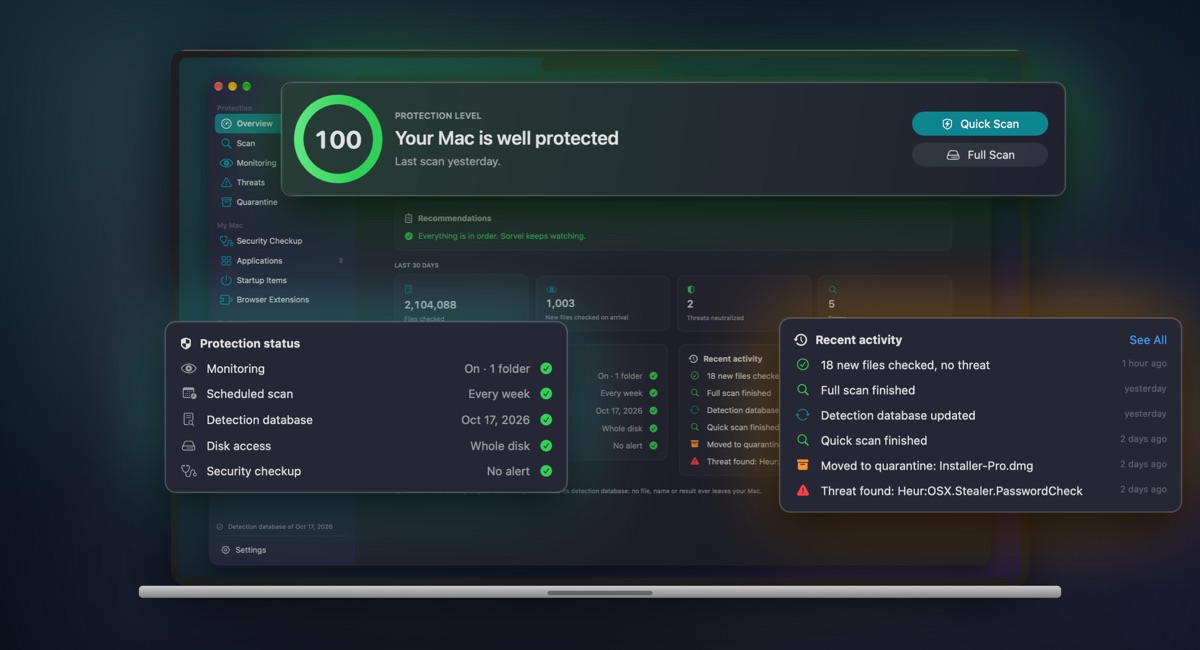
Sorvel's overview: protection level, status of every module and recent activity.
The essentials

Three things that matter.

Scan what's already there, watch what comes in, check before you open. Sorvel does all three, without asking you to be an expert.

Scan
Quick for the risky places, full for the whole disk, or scheduled so you never think about it. Every scan has its report: where Sorvel looked, what it found, and what it left out and why.
Watch
Every new file in your Downloads is checked a few seconds after it's saved. A known threat goes to quarantine before you open it.
Check
Drop an app, a disk image, an installer or an archive: Sorvel tells you who made it, whether Apple checked it, where it was downloaded from and whether it hides a known threat.
In pictures

Sorvel, screen by screen.

Checking a file, watching your downloads, scanning, reviewing your Mac: here's what you'll see in the app. Tap or click an image to enlarge it.

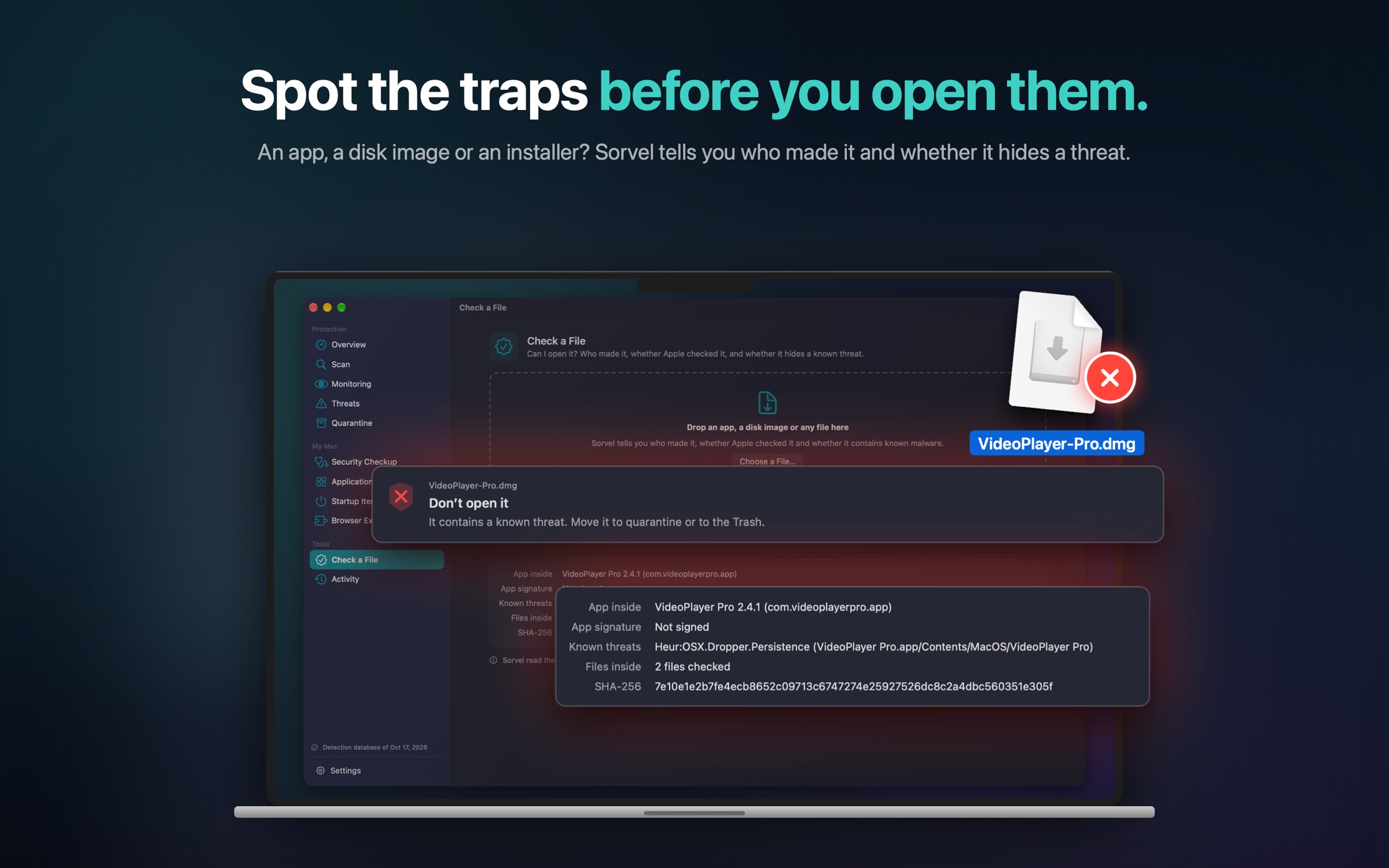
Check a file: Sorvel advises against opening a booby-trapped disk image and shows the app inside it.
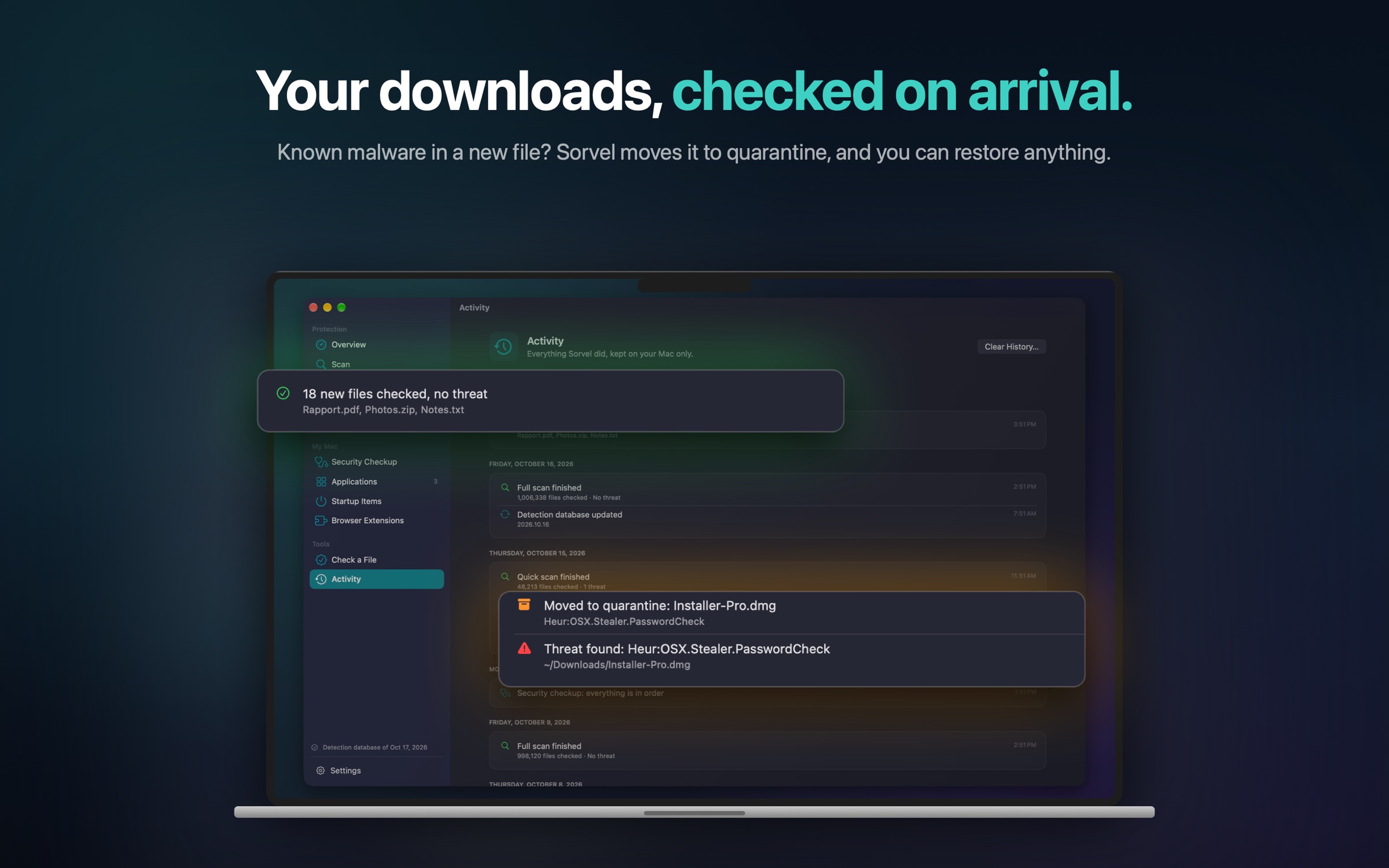
Activity: new downloads checked, then a threat found and quarantined.
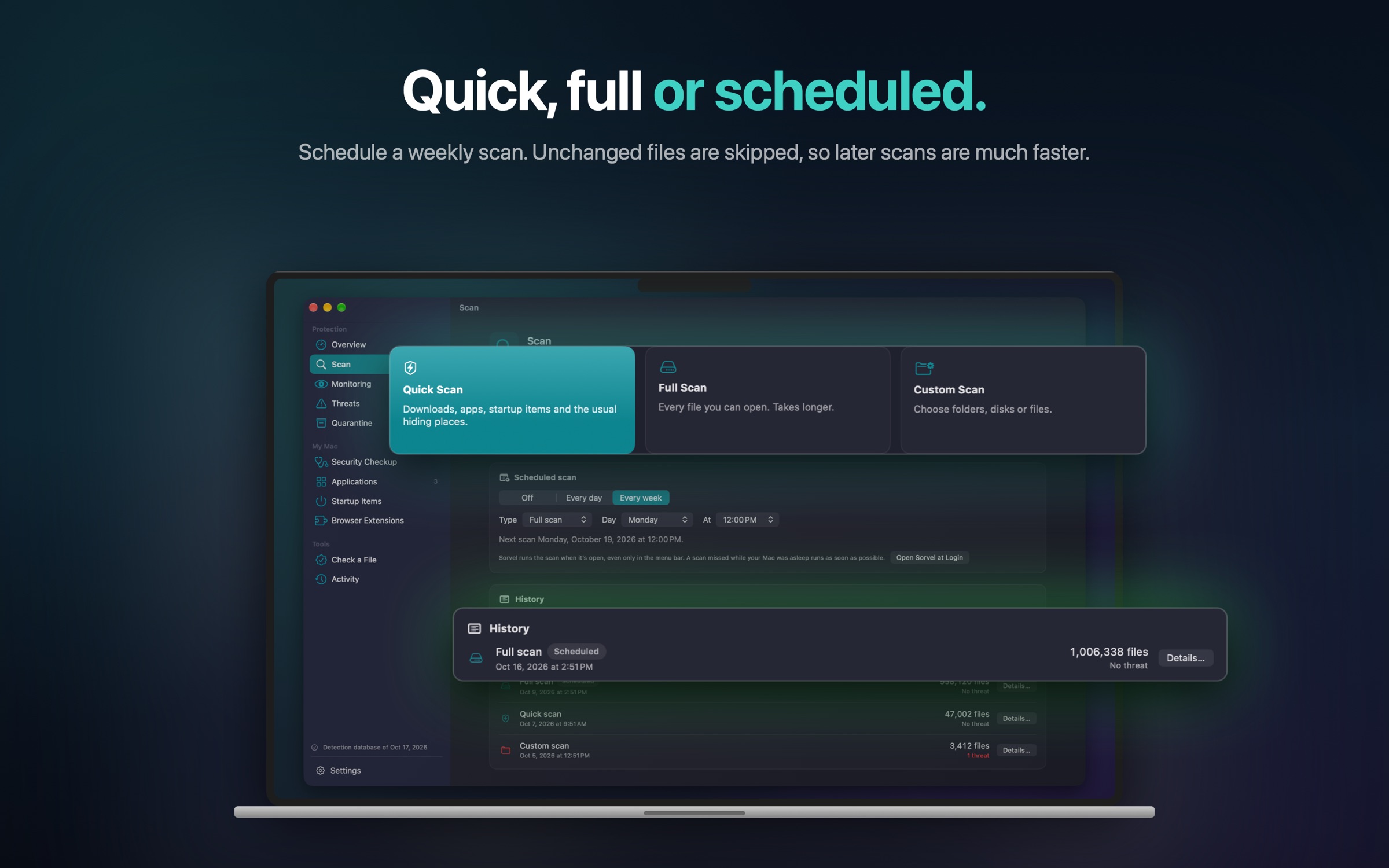
Scans: quick, full or custom, scheduled every week, with their history.
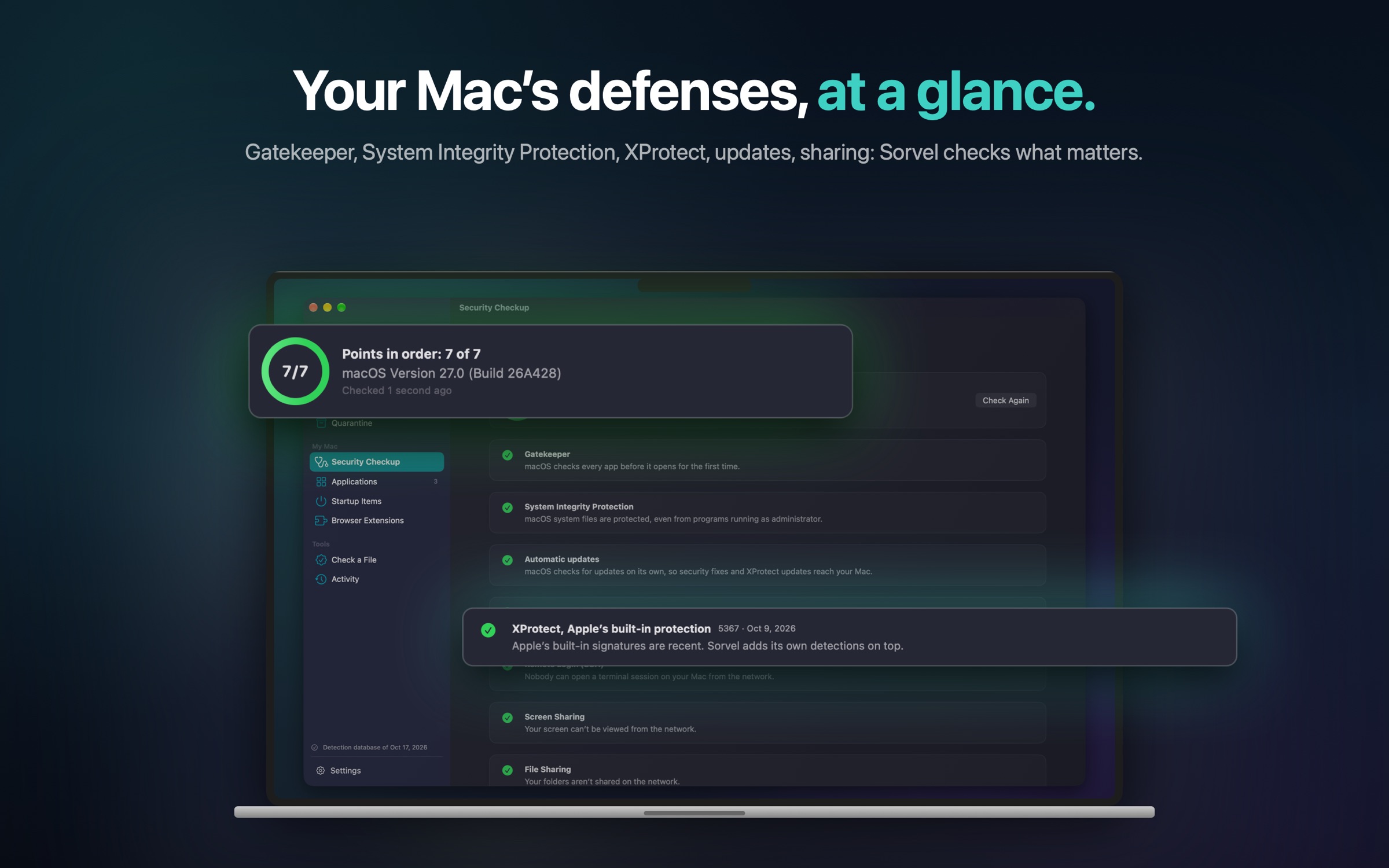
Security checkup: Gatekeeper, System Integrity Protection, updates, XProtect and sharing.
The complete suite

Everything that protects your Mac, in one place.

Sorvel doesn't just look for viruses. It reviews what starts on its own, what your apps and extensions are allowed to do, and macOS's security settings.

🔍 Scans and reports Quick, full or custom, scheduled every day or every week. Files unchanged since the previous scan are skipped, so the next ones are much faster.
👁️ Download monitoring Downloads, AirDrop transfers, unzipped archives: every new file is checked, and known threats go to quarantine.
✅ Can I open it? A plain verdict for an app, a DMG disk image, a PKG installer or a ZIP archive: developer, signature, Apple's check, where it was downloaded from.
🩺 Security checkup FileVault, firewall, Gatekeeper, System Integrity Protection, updates, XProtect and open sharing, with the steps to follow when something needs attention.
🧩 Applications Who signed each of your apps, which ones are worth a look, and a clean uninstall that takes the files left in your Library with it.
⏻ Startup items The apps and programs that start on their own, suspicious ones first, with a switch to turn off the ones you no longer want.
🧭 Browser extensions Safari, Chrome, Firefox, Edge, Brave, Arc: what each extension can read or change, and a button to remove the ones you no longer want.
🗄️ Quarantine and activity An isolated threat can't run anymore, and you can put it back at any time. The log keeps track of everything, on your Mac only.
🛡️ Menu bar Your protection level, one-click scans and the state of every module, without opening the window.
Always up to date

A signed detection database.

Sorvel recognises threats with a database of fingerprints and rules published by Absyt. It updates on its own, without waiting for a new version of the app.

Signed by Absyt Every update carries our signature. Sorvel checks it before use: a database altered on the way is rejected.
Independent of the App Store The database changes as threats do. The app itself updates through the App Store, as usual.
At your pace Sorvel installs new databases on its own, or only when you ask: it's a setting.
Privacy

Everything stays on your Mac.

Sorvel was designed so that no data leaves your Mac. Nothing is sold, mined or looked at.

No account Sorvel works as soon as it's installed, with no sign-up and no email address.
Nothing sent Your files, their names and scan results stay on your Mac. No analytics, no ads.
A single connection Sorvel downloads its public detection database from absyt.com, with no identifier and no cookie.
You stay in control Sorvel only reads what you allow, and never moves a file without your consent or your setting.
In all honesty

What Sorvel doesn't do.

Mac App Store apps run inside Apple's sandbox. That's a guarantee for you, and it sets limits we'd rather state plainly.

No blocking before a file opens Apple keeps that power for tools distributed outside the App Store. Sorvel checks every new file right after it's saved, which leaves time to act before you open it.
No antivirus catches everything Sorvel adds to macOS's built-in protections, Gatekeeper and XProtect, without replacing them. Keep macOS up to date and back up your Mac.
No access to system files macOS protects its own files, and Sorvel can't change them. It does tell you when a security setting is turned off.
A few settings can't be read FileVault and the firewall can't be read by a Mac App Store app. Rather than guess, Sorvel says so and opens the right setting.
Price

One price. Paid once.

A one-time purchase on the Mac App Store, yours for life. No subscription, no in-app purchase.

✓Every feature included, no hidden paid tier
✓Detection database updates included
✓On all your Macs signed in with the same Apple Account
✓€22.99 in France; the App Store shows the price for your country
Questions

Frequently asked questions.

Another question? The support page covers every feature.

Does Sorvel scan in real time? +

Sorvel checks every new file in your Downloads, and in the folders you choose, a few seconds after it's saved. It can't block a program before it opens: Apple keeps that power for tools distributed outside the App Store.

Why does Sorvel ask for access to my disk? +

By default, a Mac App Store app only sees your Downloads. By choosing your startup disk in Apple's window, you let Sorvel scan all your files. You can remove that access at any time in its Settings.

Does Sorvel slow my Mac down? +

Monitoring only checks new files, in a few milliseconds. A full scan works the disk harder; the next ones skip unchanged files and are much faster.

Are my files sent anywhere? +

No. Everything is scanned on your Mac. Sorvel's only connection downloads its public detection database, with no identifier.

Does Sorvel replace XProtect? +

No, it adds to it. XProtect is macOS's built-in protection; Sorvel brings its own detections, a checkup of your settings and a look at your apps, your extensions and what starts on its own.

What if Sorvel flags a clean file? +

Restore it from Quarantine, then choose "Always Ignore This File". Write to us: we fix the detection database for everyone.

Which version of macOS do I need? +

macOS 14 Sonoma or later, on an Apple silicon or Intel Mac.

Contact

A question, a false positive?

Write to us. We read every message, and every false positive you report improves the database for everyone.

contact@absyt.com
Support ← Back to Absyt